Prescribe exercises: the 8 execution modes
What a prescription is, the 8 modes (sets, time, repeaters, attempts, distance, circuit, continuous, not applicable) with climbing examples, load, RPE and notes.
Prescribing means telling the athlete exactly what to do with an exercise: how many sets, how long to hold, how long to rest, with what load and at what intensity. From that, the athlete’s app builds its guided player, which times every effort and every rest. An exercise with no prescription is no use to them: they don’t know what to do with it.
The idea: the mode decides the form
Every prescription starts with How it is performed, the execution mode. The mode decides which fields exist (a repeater has “Hold” and “Release”; a traverse has “Cover”) and how the player builds the steps. That’s why you only see the fields that make sense for that exercise.
- The mode comes from the exercise: it’s the one chosen when it was created. When it arrives that way you’ll see the from the catalogue label next to “How it is performed”.
- You can change it in each prescription. For example, an exercise that usually goes by sets and reps can be set as attempts today for a test.
- When you switch mode, whatever still means the same thing is kept (sets, rest, RPE and notes) and whatever doesn’t exist in the new mode is dropped.
- Changing the mode on the exercise card doesn’t touch the prescriptions you’ve already made: it only affects new ones.
The 8 modes
| Mode (as it appears in the app) | What it’s for | Fields | Climbing example |
|---|---|---|---|
| Sets and reps | Reps are counted. The athlete counts them and confirms at the end of each set. | Sets, Reps, Rest, Load, Repeats per side, To failure | Weighted pull-ups: 4 sets of 6 with +8 kg and 2 min rest |
| Timed sets | Each set is a single timed effort, with no cycle inside. | Sets, Duration, Rest, Load, Repeats per side, To failure | Hangs on a 20 mm edge: 6 sets of 10 s with 3 min rest |
| Repeaters (work:rest cycle) | Within each set a hold-and-release cycle repeats. | Sets; Within each set: Reps, Hold, Release; Rest, Load, Repeats per side | 7:3 repeaters on an edge: 4 sets of 6 reps, hold 7 s, release 3 s, 3 min between sets |
| Attempts | What matters is the number you get, not finishing. Ideal for tests. | Attempts, What gets recorded, Rest between attempts, Load, Repeats per side | Max finger strength test: 3 attempts, the best is recorded, 3 min between attempts |
| Sets by distance | The set is measured in metres, moves or routes. The athlete moves on by hand. | Sets, Cover, Unit (metres, moves or routes), Rest, Load | Rope endurance: 4 sets of 2 routes at 6a; or a traverse of 4 sets of 30 moves |
| Circuit laps | Several stations done in full and repeated. | Rounds, Stations, Per station, Rest between rounds | Boulder circuit: 3 laps of 5 problems, 60 s per problem, 4 min between laps |
| Continuous work | A single block, with no sets, rests or load. | Duration | ARC: 30 min of easy traversing without stepping off |
| Not applicable (not playable) | The athlete doesn’t perform it in the app: you record it. | None | Footwork technique rubric; analysing a video |
All playable modes also ask for Intensity (RPE) and accept notes for the athlete.
Choosing quickly
- Reps are counted: Sets and reps.
- Each set is timed in one go: Timed sets.
- Within the set, holding and releasing repeats: Repeaters.
- You care about the result (the best, the average): Attempts.
- The set is measured in metres, moves or routes: Sets by distance.
- There are stations and you go round in laps: Circuit laps.
- It’s a single duration, with no multiplier: Continuous work.
- It isn’t done with the phone in front of you: Not applicable.
The usual doubts
Timed sets or repeaters. If holding and releasing repeats within each set, it’s repeaters. If the set is one continuous hold, it’s timed sets. “6 sets of 10 s hanging” is timed sets; “4 sets of 6 reps of 7 s on and 3 s off” is repeaters. In repeaters, Release is the short pause inside the cycle and Rest is the long pause between sets: don’t mix them up.
Timed sets or continuous work. If there’s a multiplier (“3 sets of 10 min of ARC”), it’s timed sets. If it’s a single duration (“30 min of ARC”), it’s continuous work.
Attempts or sets and reps. With attempts the goal is the result (how long they held, how much they lifted); it doesn’t matter whether they “completed” it. With sets and reps the goal is to complete what’s prescribed. What gets recorded lets you choose between The best attempt, The average of the attempts or Every attempt.
Circuit laps. All stations last the same and the app has no field to describe each one: write in the notes what each station involves and in what order. This mode has no load; if a station uses weight, say so in the notes.
Not applicable. It can only be chosen when creating or editing the exercise, not when prescribing. In the prescription you’ll see “This exercise isn’t run in the player; the trainer records it.” and nothing to fill in. It never counts as “Not prescribed”.
The common fields
Rest
In most modes it’s the rest between sets (in attempts, between attempts; in circuits, between rounds). The player times it. It’s optional: with no rest, the sets run back to back.
Load
Choose the type and, if needed, the value:
| Option | What it means | Value |
|---|---|---|
| Bodyweight | No added load | None |
| Added weight | Weight added (belt, vest) | Kilos |
| Assistance | Weight taken off (pulley, band) | Kilos |
| % of bodyweight | A percentage of the athlete’s bodyweight | Percentage |
With % of bodyweight the app uses the weight on the athlete’s profile (Athletes → (athlete) → Settings → Weight). Keep it up to date. In the summary you’ll see the load as a percentage of bodyweight (for example, 80%).
Load doesn’t appear in Circuit laps or Continuous work, and it’s hidden on exercises that require a Tindeq: the dynamometer measures force; you don’t add weight.
Intensity (RPE)
From 1 to 10, how hard the athlete should push. In a max test, high; in an ARC session, low and steady. It’s optional.
Repeats per side
Tick it when the exercise is done one arm or one leg at a time: the player builds each set for both sides. On some catalogue exercises the checkbox says something else (“Repeats per area”, for example) because that’s how it comes on the card. It isn’t available in circuit, continuous or distance modes.
To failure
Only in Sets and reps and Timed sets. The athlete does as much as they can, and the number you set becomes a reference.
The numbers
Number fields start at 1. Time fields come with shortcuts for typical values (for example, 7, 10 or 20 s for “Hold”).
Notes for the athlete
Every prescription accepts notes: grip, tempo, edge depth, what counts as a valid attempt… The athlete sees them while getting ready for the exercise and during long rests, never mid-effort, so they don’t have to read while hanging off an edge.
In the planner the field is called Notes for the athlete; in the session editor, Notes.
The preview and the “what’s missing” notice
Once the prescription has the minimum, a strip appears at the top showing what the player will do, for example: Get ready → 10 s → 3 min rest → × 6 sets. It’s the best way to check you’ve set what you meant.
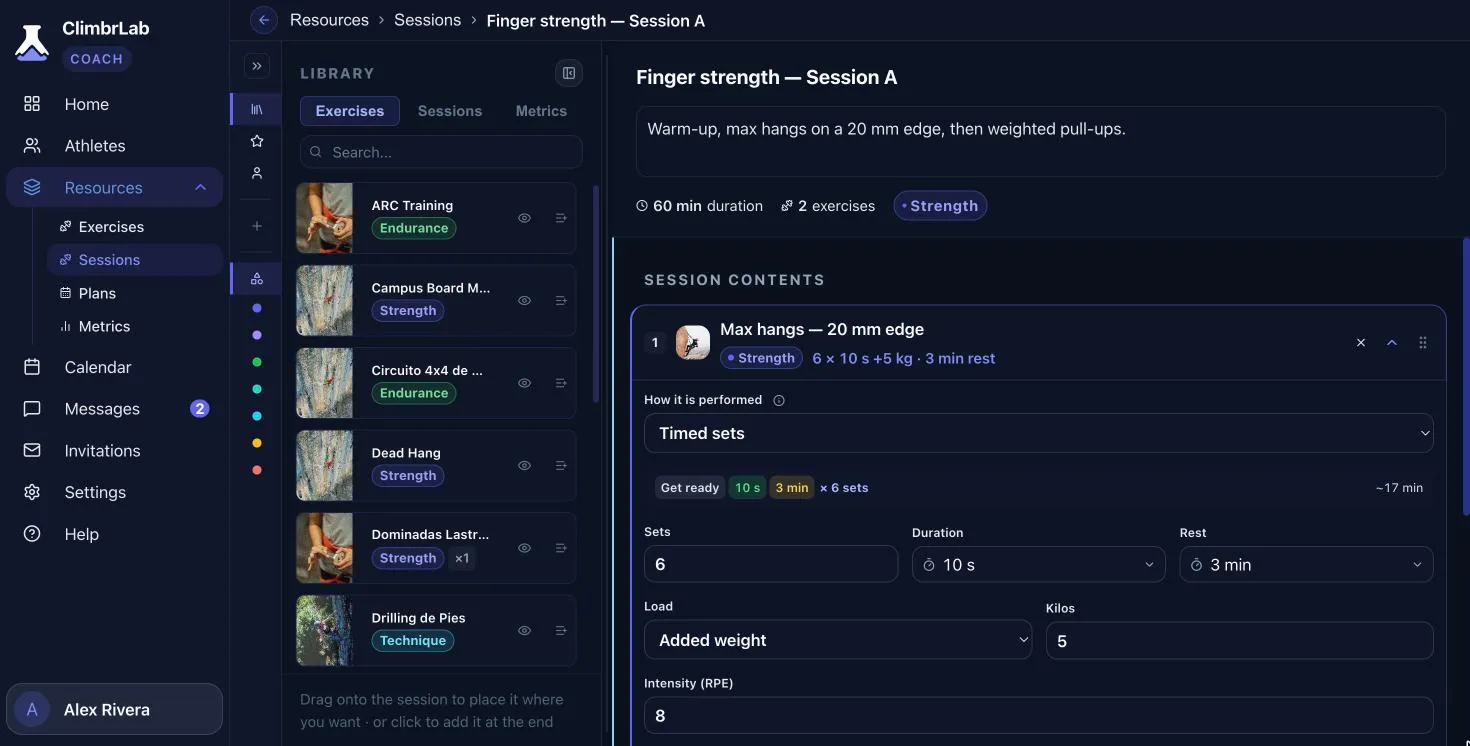
In the planner’s prescription window, the footer tells you exactly what’s missing instead of a generic “incomplete”:
| Mode | Notice if the essentials are missing |
|---|---|
| Sets and reps, Repeaters | “Missing the reps per set” |
| Timed sets | “Missing how long each exposure lasts” |
| Repeaters | “Missing how long each rep lasts” |
| Attempts | “Missing the attempts” |
| Sets by distance | “Missing what the athlete covers” |
| Circuit laps | “Missing the laps per block” |
| Continuous work | “Missing how long the block lasts” |
| None chosen | “The exercise still needs prescribing” |
If something’s missing, the button says Leave it like this; if it’s complete, Done. Leaving it half done is a legitimate option (to finish it later), but remember that something incomplete is no use to the athlete. Rest, load, RPE and notes never count as missing: they’re optional.
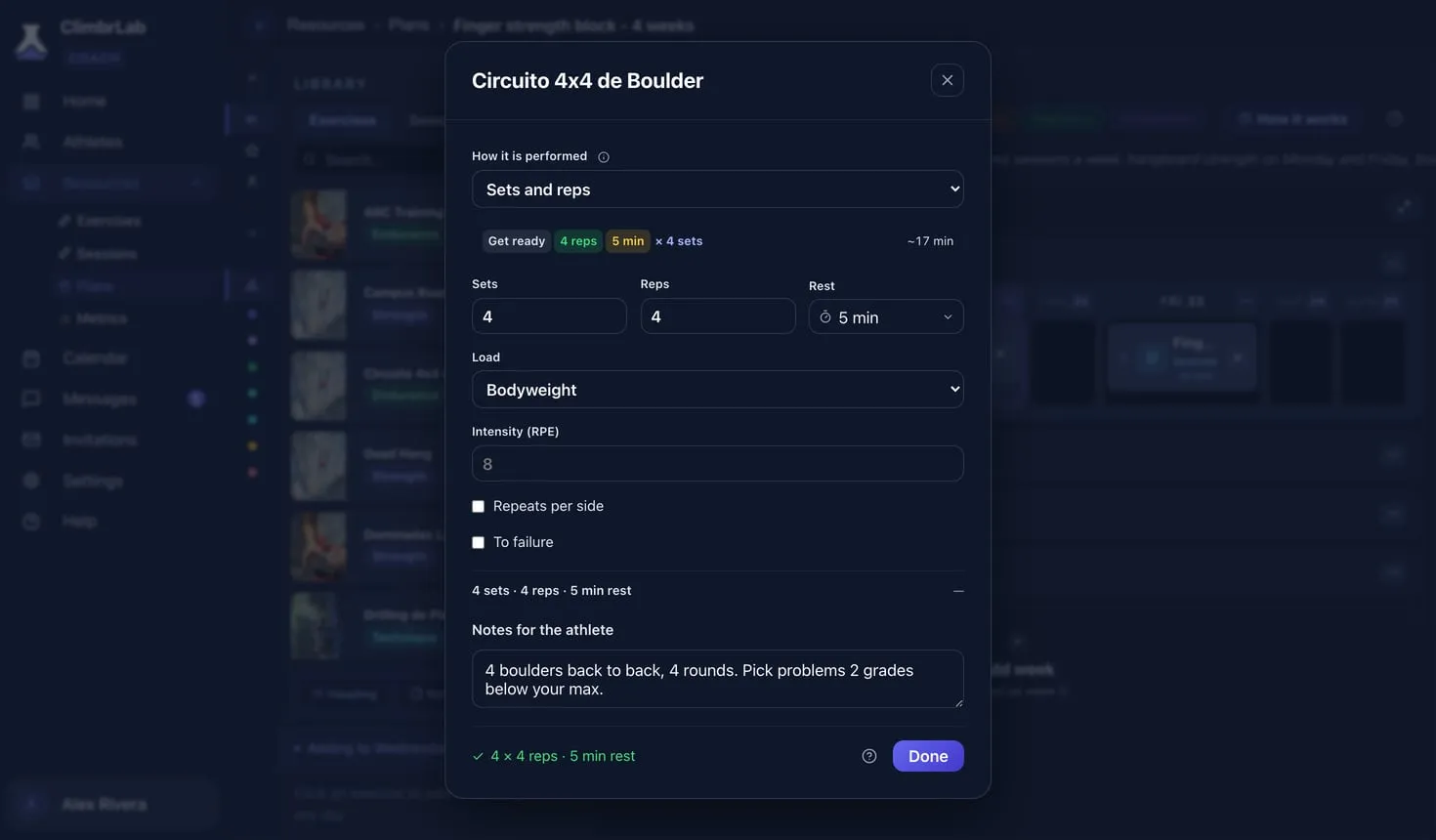
Everything saves on its own, with every change. Closing the window or pressing Esc loses nothing.
The estimated duration
At the end of the summary you’ll see how long the exercise lasts:
- Exact (“~13 min”) only in Timed sets, Repeaters and Continuous work, because in those modes all the time is prescribed. It includes the 3 s countdown before starting.
- Approximate (“~9 min approx.”) in Attempts, and only if you set attempts and rest.
- No figure (a dash instead of the number) in the others, because the athlete closes the work by hand: eight pull-ups take as long as they take.
The preview strip at the top has its own figure on the right, and that one shows in every mode, including those the summary leaves without a figure: in the window in the previous image, 4 sets of 4 reps with 5 min rest show “~17 min” on the strip and a dash in the summary. The strip assumes a fixed time per rep, so treat it only as a guide.
Heads-up: the duration you see on a session doesn’t add up these estimates. It’s the Duration you set when you created it plus any rests you’ve added as standalone items. We explain it in sessions.
Where to prescribe
| Where the exercise is | How to prescribe it |
|---|---|
| On its own on a plan day (template or athlete’s plan) | On the exercise card, Prescribe…, or double-click it. The window opens with the exercise’s name. |
| Inside a library session | In the session editor: click the exercise and the prescription opens in the same row (Edit prescription / Close prescription). |
| Inside a session placed in a plan | It isn’t prescribed from the plan: the card says “The prescription is defined in the session”. To change it for just one athlete, customise the session. |
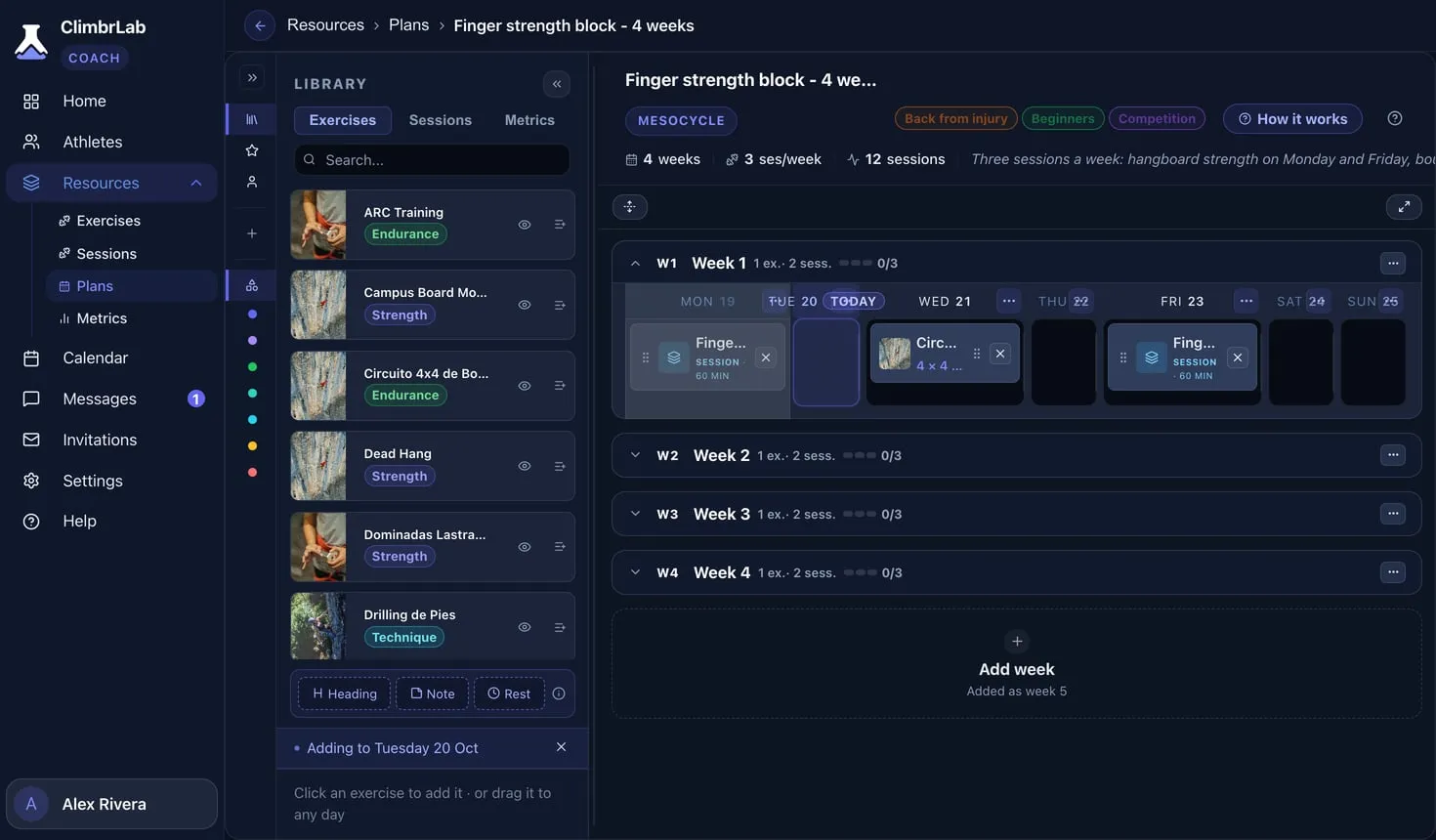
Sessions inside a plan are covered in customise a session, and the rest of the planner in the planner.
What happens if you leave exercises unprescribed
- In the session editor you can’t leave while any is unprescribed: they’re marked in red and you see “1 exercise without a prescription. Complete it to leave the page.”.
- In an athlete’s planner, if you try to leave with exercises that have no sets or target (the ones marked in red), the app warns you that they’ll be removed from the plan when you leave. You can choose Keep editing or Leave and delete.
- In a template there’s no warning on leaving. Unprescribed cards stay as “Not prescribed”; check them before assigning the template.
Common questions
Why can’t I see the Load field?
Because the mode doesn’t have it (circuit or continuous work) or because the exercise requires a Tindeq. More in Tindeq for coaches.
I changed an exercise’s mode in the library and my plans are the same
That’s expected: the change only affects new prescriptions. Existing ones are changed one by one.
Where is “Not applicable” in the prescription?
It isn’t there: it can only be chosen on the exercise card (create an exercise).
Can I prescribe the same exercise two ways in the same session?
Yes. Add it twice and prescribe each row separately: for example, a 7:3 as a warm-up and another at the limit.
My athlete has no weight on their profile and I’ve set “% of bodyweight”
The prescription saves anyway, as a percentage. But the weight on the profile is the reference the app uses for these loads, so ask them to fill it in or add it yourself in Settings on their profile (athlete profile).