Hardware integration
Tindeq Progressor, inside your coaching dashboard
ClimbrLab connects to the dynamometer over Bluetooth and stores the full force curve - not just the final number - in the athlete history. Six capture protocols, per-hand measurement, and exercises the dynamometer runs from start to finish.
Request early accessWe are opening access for coaches.
What a capture looks like
Demo running on simulated data: switch protocol and you get the curve, the peak and the reference line. In the app this same view reads the real dynamometer.
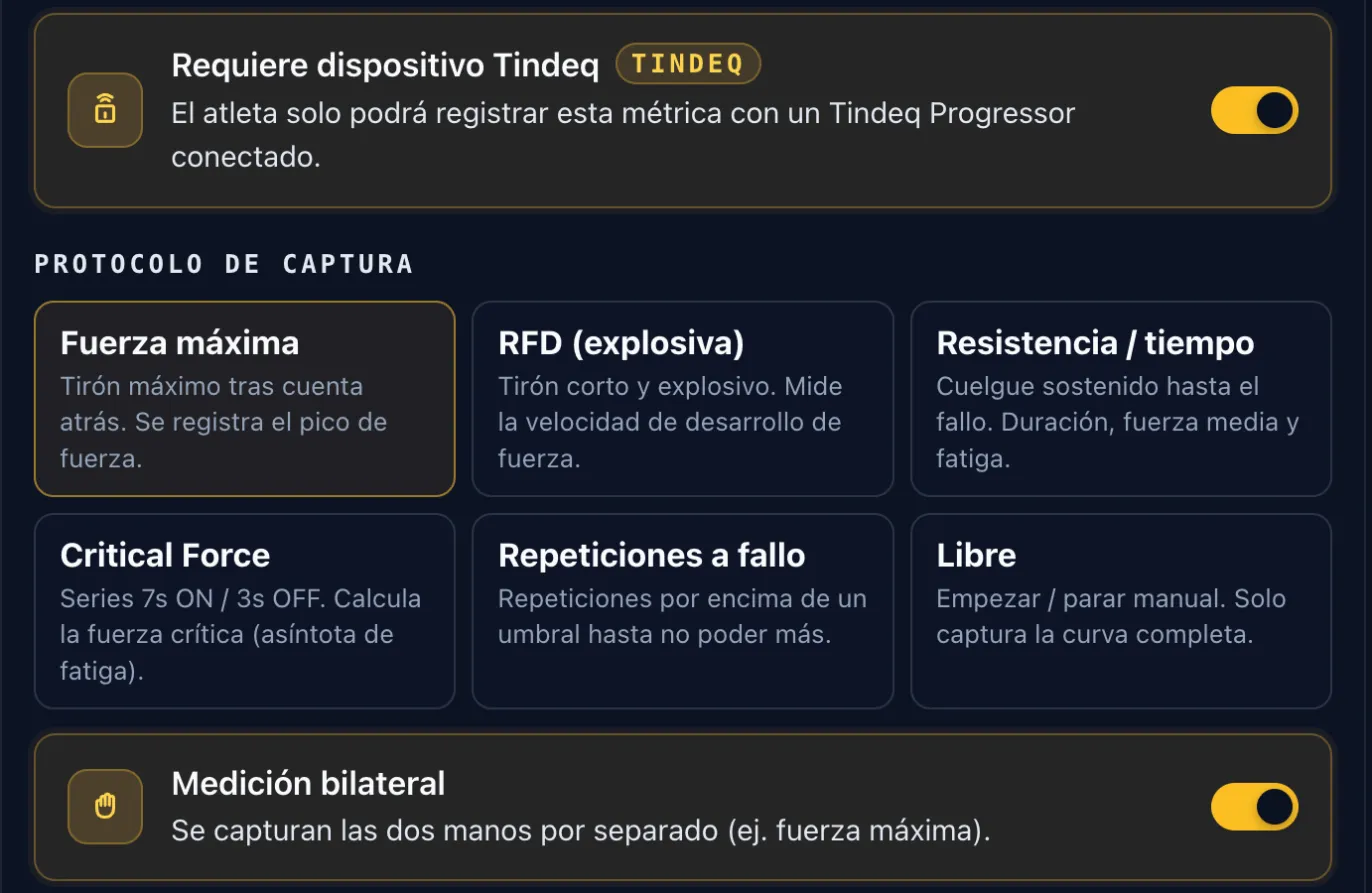
The six capture protocols
A metric template defines what is measured, how and in what unit. Flag it as Tindeq and you also choose the capture protocol, which the athlete then sees cued during the measurement.
| Protocol | What it measures | When to use it |
|---|---|---|
| Max strength | The force peak in a short, maximal effort | The baseline indicator of a strength block. Three 5-second attempts, keep the peak. |
| RFD (explosive) | How fast that peak is reached | When the limiter is contact strength on boulders, not maximum force. |
| Endurance / time | How long the effort is held | Routine tracking: time to failure, compared against itself every 4-6 weeks. |
| Critical force | The force sustainable over time | Specific endurance blocks. It is what the athlete holds on a long route. |
| Reps to failure | Repetitions until failure | An alternative when you want accumulated load rather than a peak. |
| Free capture | The curve alone, with no protocol maths | Manual start and stop. For a warm-up, a one-off check, or anything that does not fit the other five. |
The force curve is stored alongside the result, so a month later you can look at the shape of the effort and not only the figure. On endurance, the cut-off is set as a percentage of the athlete's max strength - 60% by default - and the test closes itself once force drops below it.
Not just testing: the Tindeq can run the whole exercise
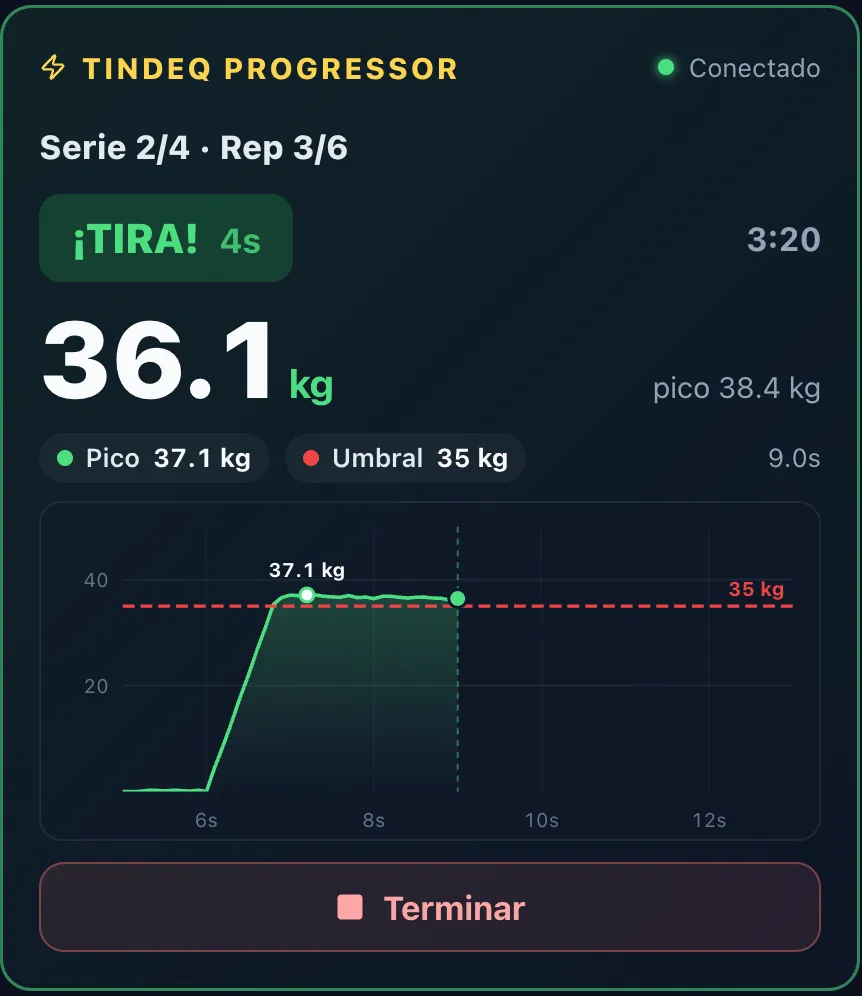
An exercise can be flagged as device-guided. You prescribe it with the same figures as any repeaters - sets, reps per set, seconds pulling, rest between reps and rest between sets - and ClimbrLab compiles that into the capture. During the session the player runs it on its own.
| What you prescribe | What happens in the session | What comes back |
|---|---|---|
| 4 sets x 6 reps, 7 s pull and 3 s release | A countdown, and from there the card cues every pull and every release, set by set | One continuous force curve, sliced by rep and by set |
| A target force, say 35 kg | The athlete sees their live line against the target line | The percentage of reps that reached the target |
| To failure instead of a closed number | The prescribed reps become the ceiling: the athlete stops when they cannot hold any more | Sets completed, force drop-off between the first set and the last, time under tension and impulse |
The set is logged into the session like any other, with the peak written into the load field. Nothing to copy by hand from one app to another.
What builds up over time
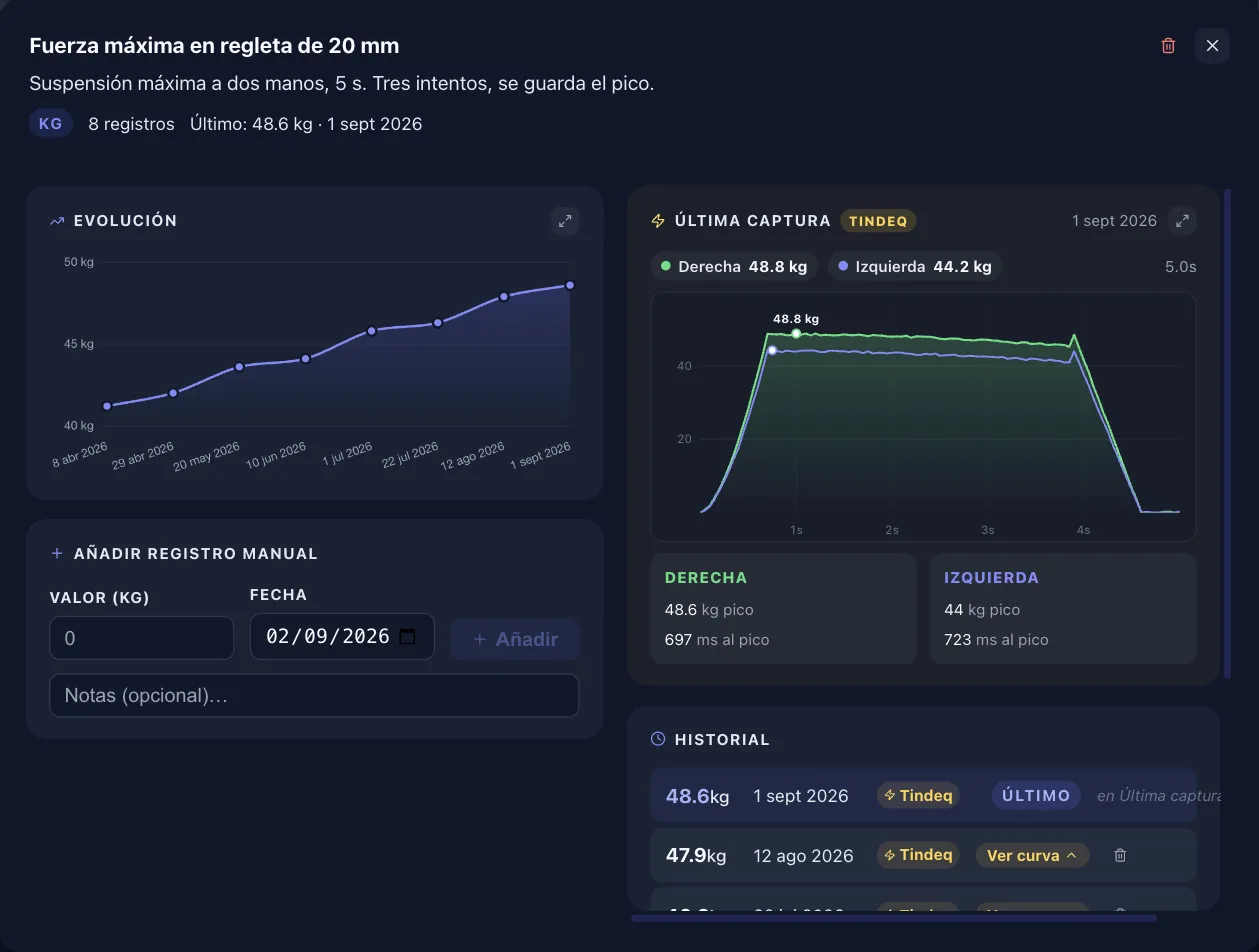
A dynamometer does not pay for itself with one measurement, it pays for itself with the series. This is what ClimbrLab keeps so the comparison you make six months from now means something.
The template also carries the category - strength, power, endurance, technique, mobility, anthropometry or mental - which is what stops a coach with forty metrics from drowning.
How it connects, depending on where you train
There is no third-party app in the middle: pairing happens inside ClimbrLab. What changes is the Bluetooth layer each platform uses.
| Where | How it connects | Note |
|---|---|---|
| Mobile app (Android and iOS) | The system's native Bluetooth | The recommended route at the gym. |
| Chrome or Edge on desktop | The browser's Web Bluetooth | Useful for table testing with a laptop in front of you. |
| Safari on iPhone or iPad | Does not work | Safari does not implement Web Bluetooth. Use the app. |
If the browser cannot do it, the app says so explicitly rather than failing silently.
Taring: the step that decides whether your data is worth anything
On connecting, the app forces you to tare before measuring, and it is not bureaucracy. Tare with the device hanging one way and then reposition it, and the weight of the rig itself enters the measurement - every number comes out shifted.
It is the most common mistake with dynamometers and the most expensive: it does not break one measurement, it breaks the comparison between all of them. Each test re-tares automatically at the start.
Set the Tindeq in your gripping position and let go of it completely, without touching or pulling on it. Once it is still, press "Tare".
Per-hand measurement and asymmetry
Flag the test as bilateral and the capture gets tabs for right and left hand, with their two graphs. You can overlay them, and the app works out the difference between hands as a percentage, indicating which side is stronger.
Each hand repeats separately without losing the other - which is exactly what you need when an athlete is coming back from injury and you only want to re-measure the affected side.
What works with no dynamometer
Worth stating plainly, because not all of your athletes will own one: the Tindeq adds a measurement layer, it is not a condition for using the platform.
- Cycle-based planning and plan assignment
- The session player with loads noted by hand
- Session feedback: RPE, mood, discomfort and notes
- Route logging and injury tracking
- Messages and calendar
- Manual metrics of number, time or scale type
The only thing you cannot assign to an athlete without a device are the metrics flagged as Tindeq - and the app warns you beforehand, naming exactly who does not have one.
From the number to the decision
A test is only worth running if it changes something in the plan. Three readings you can settle from the athlete history:
Frequently asked questions
Do I need a Tindeq to use ClimbrLab?
No. Everything else works without a device. The Tindeq only unlocks the metrics flagged as Tindeq.
Does any Progressor model work?
The integration talks to the Progressor over Bluetooth. If your unit pairs with the official Tindeq app, it pairs with ClimbrLab.
Can I run tests from a computer?
Yes, with Chrome or Edge on desktop via Web Bluetooth. Safari on iPhone or iPad does not support it: there you need the mobile app.
Is the Tindeq for training or only for testing?
Both. Flag the exercise as device-guided and prescribe it like a set of repeaters: the player cues every pull and every release, and the capture comes back sliced by rep and by set.
Is the curve stored or only the result?
The full force-over-time curve, alongside the value. That is what lets you compare the shape of the effort between blocks, not just the peak.
An athlete bought a Progressor after signing up. How do I enable it?
Today that is declared once in the onboarding questionnaire and cannot be changed from the app yet. Write to us and we will enable it on their profile.
Keep reading
Do you coach with a dynamometer?
ClimbrLab brings Tindeq tests, cycle-based planning, injury tracking and the history of all your athletes into a single dashboard.
Request early access